
Yesterday, 03/16/09, Winterboard had an update. (If you haven't been on cydia go on it and update!) The changes in the update are listed above^^
- Made Wallpapers Work Again
- Prioritize Apple's ImageCache
- Per-page Wallpaper Page#.png
- Just create a folder (name it whatever you'd like)
- Drag in some pictures into that folder.(Same number of pictures as you have pages on your iPod/iPhone)
- Make sure you can see the file extensions of the images.
- To view file extensions on Windows XP go to any folder on your computer and look on top it should says Tools-->Folder Options-->View-->Uncheck Hide Well Known Extensions
- To view file extensions on Vista/Windows 7 go to control panel and in the search type in "folder" and it should say folder options somewhere then go to View-->Uncheck Hide well Known File Extensions
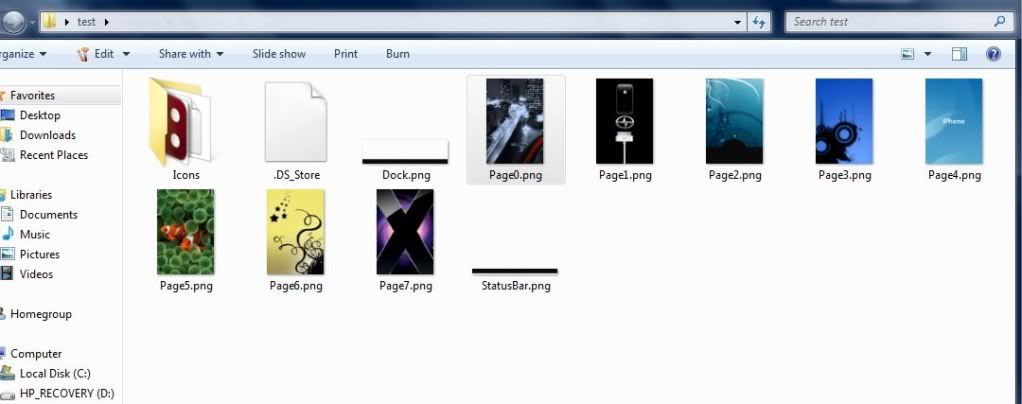
- All the pictures you have in the folder you created earlier need to be named like so:
Each name corresponds with which page number you want it on. Page0.png(page 1) Page1.png(page 2) Page#.png(etc..) MAKE SURE TO CHANGE THE ENDINGS TO .png - Once you have renamed all your images correctly you need to SSH them into your Themes folder on your iPod/iPhone.
- Don't know how to SSH themes from your computer to your iPod/iPhone??
CLICK THE FOLLOWING LINK: HOW TO SSH THEMES
- Don't know how to SSH themes from your computer to your iPod/iPhone??
Hope that was informative enough. Have any questions?
leave a comment below

